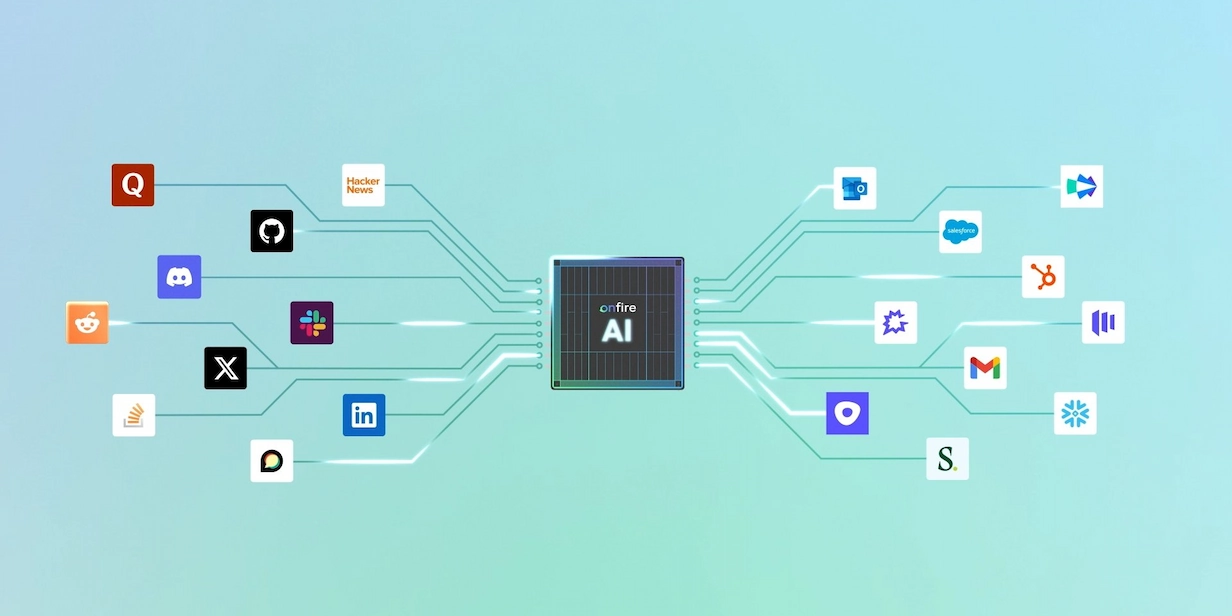
The 18 Best MCP Tools for Sales Teams



If you're reading this, you're likely using an AI agent to automate some of the tedium of sales: account research, prioritization, and scoring, for example. But you've also probably noticed that agents need LOTS of information about your business to get things right. Without that information, you end up left with plenty of tedium yourself.
MCP tools connect your AI agent to other systems so it has the context it needs to make good decisions. In this article, we'll walk you through the best MCP tools for sales teams.
Top MCP tools for sales
(Scroll down for more details about each MCP.)
- Onfire: Account intelligence on technical buyers.
- Notion: Reference your ICP definitions and playbooks.
- Clay: Run enrichment and Functions.
- LeadIQ: Search and enrich contacts by ICP.
- HubSpot: Full read/write across contacts, deals, activity.
- Attio: Flexible AI-native CRM records and recordings.
- Slack: Search, post, and pull deal threads.
- Gmail / Google Workspace: Search, read, and draft email.
- Google Calendar: Check availability and manage meeting events.
- Smartlead: Monitor cold-email stats and deliverability health.
- Instantly: Run high-volume campaigns and email diagnostics.
- Lemlist: 40+ outbound actions from one prompt.
- Salesforce: Read and update CRM records conversationally.
- Common Room: Query and act on community signals.
- Amplemarket: Prospect, enrich, and enroll without duplicate effort.
- Outreach: Manage sequences and pull call transcripts.
- Salesloft: Pipeline, deal, and call context.
- Gong: Briefs from recorded sales calls.
What Are MCP Tools?
MCP tools let your AI agent interface with other systems so it can use them to produce better, more accurate responses, or to take action inside those systems. For example, instead of you copying deal details out of your CRM and pasting them into a chat window, the agent can use an MCP tool to read the record directly.
MCP stands for Model Context Protocol, an open standard introduced in late 2024. Because it is universal by design, an MCP connection you set up today will work with Claude, ChatGPT, Cursor, or whatever comes next.
The difference between MCP servers, connectors, and plugins
Today you might hear three terms (MCP server, connector, and plugin) used as if they're interchangeable. They're not, and the latter two mean slightly different things depending on whether you're working in Claude or ChatGPT.
- MCP server means the same everywhere (as we've mentioned, it's a universal standard). It's the standardized backend a tool runs so that any MCP-compatible agent can call its capabilities, typically via APIs. SaaS applications like Salesforce, Slack, and Onfire each expose one.
- Connector is what the Claude apps (Claude.ai, Claude Desktop, and Cowork) call a remote MCP server you've activated via the Claude GUI. ChatGPT used the same term until December 2025, when OpenAI renamed connectors to apps; underneath, they're still MCP.
- Plugin: In Claude Code and Cowork, a plugin is an installable bundle: it can package one or more MCP servers together with skills and commands, so you install a whole workflow in one step rather than wiring up each piece. In ChatGPT, "plugins" were the original 2023 add-on system; OpenAI retired them in April 2024 in favor of GPTs and Actions, and then apps. Today ChatGPT does not have the concept of plugins.
Bottom line: these are all ways of connecting external tools to AI platforms and agents. MCP is the underlying technology.
What do you use MCP tools for?
MCP tools are essential if you want your AI agent to work at full potential. (Claude Cowork is the most popular agent for revenue teams, at least as we write this in summer 2026.) These agents take work that used to require five separate point solutions and complete it for you based on natural language prompts. Now you simply ask for what you want, and the agent decides which servers to call to get it done.
How Do MCP Servers Help Sales Teams?
MCP tools help sales teams by automating much of the difficult manual labor that goes on before you start a conversation:
Account research
If you're prepping for an enterprise security deal, you need to know what the account actually runs. A job post from eight months ago won't tell you. With the right servers connected, your agent can pull real signals about technology in use, the relevant teams, and recent activity, then assemble a brief. No more stitching together ten browser tabs.
Prioritization
Most account lists are too long to act on. An agent connected to live buyer intelligence and your CRM can rank accounts by fit and momentum, then surface the short list that deserves attention this week. That way, the scoring is done before you start your day, and you open with the short list already in hand.
Meeting prep
Thirty minutes before a call with a data platform's infrastructure team, an agent can pull the deal history from your CRM, review the latest engagement, and combine it with the account's recent technical activity to hand you a one-page summary.
Outreach drafting
Once the agent knows who it's writing for and why they might care, it can draft a message that reflects the problem your prospect has been working on. That draft is a starting point you can then sharpen, instead of a generic, "personalized" template.
Multi-threading
Single-threaded deals stall when your champion stops responding. That's where an agent with CRM and intelligence access can map the relevant other people in the account, flag who hasn't been engaged, and prompt you so you can widen the conversation before momentum dies.
18 Best MCP Tools for Sales Teams
The cost tags below are a rough guide as of mid-2026, ordered to help you find what a rep can use today. "Free tier" means a standalone $0 plan you can sign up for yourself. "Free with a [product] license" means the connector costs nothing but only works against a system your company already runs (your CRM, your Slack, your Google account). "Paid, with self-service tier available" means low-cost plans you can buy online without talking to sales. "Enterprise" means sales-led pricing. Pricing changes often, so confirm current terms with the vendor.
1. Onfire
Cost: Free with an Onfire license
Description: Every action an agent takes is only as good as its read on the buyer, and Onfire gives agents the business context they need. Its MCP server exposes the Account Intelligence Graph: which accounts match your ICP, the specific person who owns the relevant initiative, and the evidence behind both, with pre-built Agent Skills for common research and prioritization workflows.
2. Notion
Cost: Free tier available, then license-based
Description: Notion is where many teams keep their ICP definitions, sequence frameworks, and objection-handling playbooks. Its MCP server lets an agent search workspace content, read pages and databases, and create or update pages, so its output matches how your team already sells instead of a generic template.
3. Clay
Cost: Free tier available, then license-based
Description: Clay lets an agent run People Search, people and company enrichment, and the automation "Functions" your RevOps team already built, through the same credit system you use today. It's powerful for teams that have built the workflows, but it doesn't collect its own data, so output quality depends on what you feed in.
4. LeadIQ
Cost: Free tier available, then license-based
Description: LeadIQ is a newer entrant whose MCP server handles prospecting directly through the agent. It searches and enriches contacts and companies with ICP filters (flat or grouped by account) for outbound teams building lists inside the conversation.
5. HubSpot
Cost: Requires HubSpot license, available on free tier
Description: HubSpot's server has broad read and write coverage across contacts, companies, deals, tickets, and engagement activity (calls, emails, meetings, notes, and tasks), so agents can help teams move deals through stages without anyone opening the UI.
6. Attio
Cost: Requires Attio license, available on free tier
Description: Attio is an AI-native CRM, and because it lets users define their own objects and relationships, its MCP server adapts to however your team structured its data model. Agents can search, read, create, and update records across people, companies, deals, lists, tasks, and notes, and read emails, meetings, and call recordings. Reads run automatically while writes ask for confirmation.
7. Slack
Cost: Free with a Slack workspace
Description: Connecting Slack lets an agent search messages, files, and users, post notifications and daily summaries, and pull deal-thread context, keeping the team informed without anyone relaying updates by hand. It can also surface the relevant conversation history when a rep is prepping for a call (workspace admin approval required).
8. Gmail / Google Workspace
Cost: Free with a Google account
Description: Google's official Gmail MCP server gives an agent tools to search and read threads, manage labels, and create drafts. It drafts and references email but does not send on its own. The agent can check past correspondence with a prospect before writing the next note.
9. Google Calendar
Cost: Free with a Google account
Description: Google's Calendar MCP server lets an agent list events, check availability, suggest meeting times, and create, update, or delete events. It pairs naturally with the meeting-prep workflow above.
10. Smartlead
Cost: Paid, with self-service tier available
Description: Smartlead's MCP server lets agents monitor inbox performance and flag cold email campaign issues. It surfaces real-time campaign stats, deliverability and spam-health diagnostics, and lead and sending-account data.
11. Instantly
Cost: Paid, with self-service tier available
Description: Instantly's MCP server connects agents to campaign operations and email diagnostics for high-volume outbound teams. Its toolset spans campaign create/pause/update, lead management, email send and reply, analytics, and sending-account health.
12. Lemlist
Cost: Paid, with self-service tier available
Description: Lemlist's MCP server lets agents source contacts and enroll them in campaigns from one prompt. It exposes 40+ actions in total: lead search and enrichment, multichannel sequence building (email, LinkedIn, calls), campaign management, and analytics.
13. Salesforce
Cost: Enterprise
Description: Salesforce's hosted MCP server lets an agent query and update CRM data in natural language. It can read, create, and update records (respecting field-level security and sharing rules) and invoke Apex, Flows, and analytics, scoped to whichever objects your admin exposes.
14. Common Room
Cost: Enterprise
Description: Common Room tracks intent activity from Slack, GitHub, Reddit, and other channels your company owns. Its MCP server lets an agent query contacts, organizations, activities, and segments, and create or update those records, so the signals become something the agent can act on.
15. Amplemarket
Cost: Enterprise
Description: Amplemarket connects agents to its prospecting and research layer for contact discovery, enrichment, list management, and sequence enrollment. It can also look up previous touchpoints and flag whether a teammate already reached a prospect, preventing duplicate outreach.
16. Outreach
Cost: Enterprise
Description: Outreach is an enterprise sequencing platform, and its MCP server lets an agent search and create prospects and opportunities, enroll prospects in sequences, and pull call transcripts and emails, all inside the conversation rather than a separate tab. Write actions are admin-controlled.
17. Salesloft
Cost: Enterprise
Description: Salesloft's MCP server is read-only by design (at least as of June 2026). It gives an agent context on live pipeline, deals, accounts, and call recordings without taking action, suiting teams that want visibility before granting write access.
18. Gong
Cost: Enterprise
Description: Gong captures conversation intelligence from recorded calls. Its read-only MCP server lets an agent ask account- and deal-level questions and generate briefs that synthesize risks, objections, stakeholders, and next steps: insights distilled from what was said on calls, which helps with follow-up and catching commitments that would otherwise slip.
Give Your Agent The Business Context It Needs With Onfire
As sales teams increasingly adopt agentic workflows, MCP tools are becoming essential. Onfire's MCP server gives your agent access to data that reflects your unique business context and ICP. Book a demo to see how it works.
FAQs
1. What is MCP and why does it matter for sales teams?
MCP, or Model Context Protocol, is an open standard that lets an AI agent connect directly to the systems your team uses. For sales, it means the agent can pull live CRM records, buyer intelligence, and campaign data, then act on them, instead of giving generic advice from a static prompt. It turns the agent from something you consult into something that operates inside your stack.
2. Which revenue intelligence providers have MCP integrations?
The list grew quickly through 2026. On the GTM intelligence and data side, Onfire, ZoomInfo, Apollo, Clay, Amplemarket, and LeadIQ all expose MCP servers, though their depth and data quality vary widely. Of these, Onfire is the only one built specifically for software infrastructure verticals, where buyer-level accuracy matters most.
3. Can MCP tools replace my existing sales tech stack?
Not exactly. MCP doesn't replace your CRM, sequencer, or data provider. It connects them to an AI agent so they work together through one conversation.
4. Is it safe to give an AI assistant access to my CRM and email via MCP?
MCP connections use standard authentication, and most servers let you scope what the agent can read or write. Many CRM servers are read-only by default, and you can grant action permissions deliberately. As with any access decision, start narrow, test on low-stakes tasks, and expand permissions only once you trust the output. Review your provider's security documentation before connecting sensitive systems.
5. Do sales reps need technical skills to use MCP tools?
No. The point of agentic tools like Claude Cowork is that the interface is plain language. A rep connects the tools once, usually through a sign-in flow, then describes what they need: research this account, draft this follow-up, check this deal. RevOps may handle the initial setup, but day-to-day use requires no engineering background.
.webp)





%20(1).webp)














































.webp)